General Ledger Sub-Allocation Maintenance - Actual tab
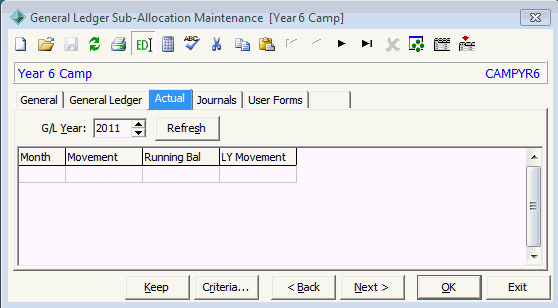
Use the Actual tab to view income and expenditure for this sub-allocation code.
 Opening the Actual tab
To open the General Ledger tab:
- Select Module > General Ledger > G/L Sub-Allocation Maintenance from the main menu.
The Set General Ledger Sub-Allocation Search Criteria window is displayed.
Tip: You can also access General Ledger functions by clicking  .
.
- Search for the general ledger sub-allocations. See Searching for general ledger sub-allocations.
The General tab of the General Ledger Sub-Allocation Maintenance window is displayed.
- Click the Actual tab.
The Actual tab of the General Ledger Sub-Allocation Maintenance window is displayed.
- Either:
General Ledger Sub-Allocation Maintenance - Actual tab key fields
Field
|
Description
|
|
|
Budget month.
|
|
|
Movement within the month.
|
|
|
Running balance of the income and expenditure for the month.
|
|
|
Journals summarised by month for all G/L accounts allocated to this sub-allocation code, from the prior year.
|
Last modified: 4/10/2012 12:07:05 PM
© 2013 Synergetic Management Systems. Published 15 October 2013.


 .
.